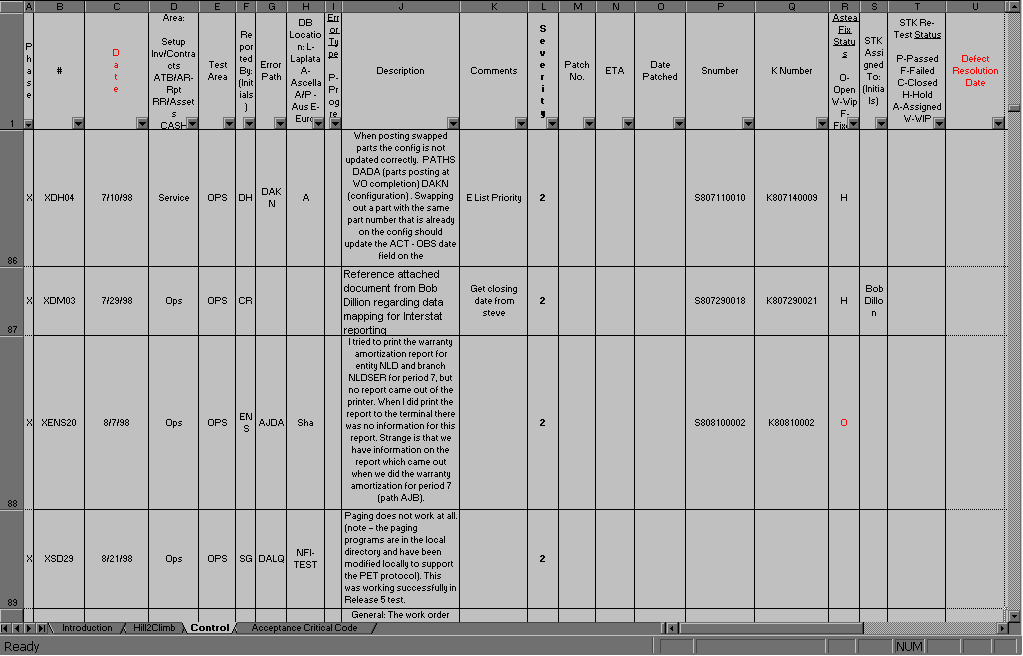
The old process used a spreadsheet as the primary tracking tool, and
it looked something like this:
| Phase |
The testing phase that occurred. At this time there are three. Blank is
undefined, U is the first wave of Phase 6 testing, and X is the second wave
of Phase 6 testing. |
| # |
The tracking number for the defect. This consists of the Phase it is in,
the initials of the individual who discovered the defect, and the defect
number for that person. |
| Date |
The date that the defect was logged. |
| Area |
A more detailed breakdown of Test Area. This was used when the testing areas
were further broken down. It is not used now. |
| Test Area |
This is 6 categories that categorize the scope of phase 6 testing. It does
not address Service, or Logistics testing. |
| Reported By |
The initials of the defect finder. |
| Error Path |
The sequence used when the defect was identified. |
| DB Location |
The database where the defect surfaced. |
| Error Type |
What form the defect takes. This column is seldom, if ever, used at this
time. |
| Description |
A brief synopsis of the error and its scope. |
| Comments |
Any changes to the situation, amendments, current statuses. |
| Severity |
A severity or priority setting arrived at by assessing the impact that the
defect has. |
| Patch No. |
The log number of the patch created to fix the defect. |
| ETA |
When the patch that will fix the defect is expected from development. |
| Date Patched |
When the patch actually arrives. |
| Snumber |
This corresponds with an Astea assigned tracking number. |
| Knumber |
This corresponds with an Astea assigned tracking number. |
| Astea Fix Status |
What status is the defect on Astea's end? This field shows whether it's
waiting for something, or if it is being worked on, or if it is closed on
their end. |
| STK Assigned To |
Shows the initials of the analyst who is assigned to retest the defect with
the new patch. |
| Retest Status |
This shows the result and progress of retesting. If it fails, this is changed
to "failed" and a new case is generated with the same information,
but with a new tracking number. The new tracking number would be the original
plus an 'a' for the second report, 'b' for the third report, et cetera. |
| Defect Resolution Date |
This is an indication of the date the defect is finally solved through the
process. |
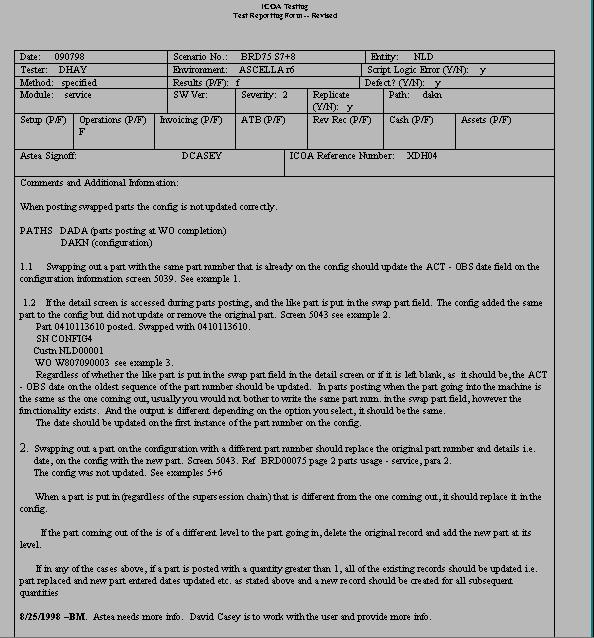
Defects are reported by an analyst or user on a Defect Tracking Sheet
that looks like this:
This form is archived on disk, and any changes to the case are appended
to this document, as well as to the Control Sheet.