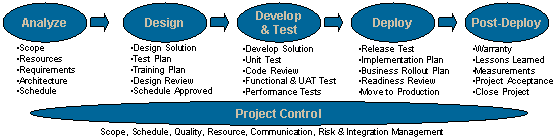
GIS Project Management Process Print this page.
Activities Print List
Analyze Activities
Activity Description Signoff Tools & Templates
Perform Project Startup Once a project manager has received notification to start working on a project, he/she begins by setting up the project.  This includes activities such as creating the project folder and project control documents.    Action Items & Issues
Assumptions & Constraints (R)
Communication Plan
PMP Checklist (R)
Risk Mitigation Plan
Status Report (R)
Status Report User's Guide
Complete Scope Statement The project request must be expanded into a full scope statement. This document contains the project justification, a description of the product, the project deliverables and the project objectives. Sponsor
Requestor
Project Manager
Scope Statement (R)
Plan Resources Identify, obtain and manage all project resources (all goods and services, including human resources) so that the appropriate resources are available when needed throughout the life cycle of the project. Business Managers
Resource Managers
Critical Computer Resource Log
Status Report (R)
Status Report User's Guide
Conduct Kickoff Meeting Bring the project team together to discuss scope, requirements, processes, roles and responsibilities, expectations, project organization, project documentation, project tools and all other project information. Includes planning for, conducting, attending and documenting the meeting.   Meeting Minutes
Review Presentation
Determine Requirements Obtain, understand, validate, document and gain business signoff for all business and technical requirements. Sponsor
Requestor
Requirements - Guidelines
Requirements - Excel
Requirements - Word
Requirements Checklist
Conduct Business Impact Analysis Contact Business Delivery Manager who will identify application/ business/ system SMEs to be interviewed, schedule and conduct the interviews with the help of the Business Continuity (BC) Planner. The interviews are conducted using the BIA interview form. The results are summarized in the BIA summary report. BDM
Business Continuity Planner
GIS Architect
BIA Interview Form (R)
BIA Summary Report (R)
Apply Measurement Guidelines Review the measurement guidelines to ensure proper compliance.   Measurement Guidelines (R)
Determine Project Solution Approach Assess various solution approaches against project requirements. Also determine if the project will be delivered in phases and if an iterative design/develop/test approach will be used. Sponsor
Requestor
Project Solution Approach Examples
Assess Technical & Architectural Impact Review the technical impact of the proposed project solution against existing or proposed architectural standards as well as the existing technical and application infrastructure. Architects will determine if the project needs to go to the TRC. Architecture Team Critical Computer Resource Log
Architectural Design Examples
Technical Impact Checklist (R)
Setup Development & Test Environments Complete all technical tasks necessary to ensure the readiness of the development and test environments (hardware, software, network, PCs, etc.).    
Create Test Approach Develop and document approach for unit test, code reviews, functional test, release test, user acceptance test and production validation. Document approach for using past project artifacts on the current project and if necessary, also develop and document approach for performance testing.   Test Approach
Create Project Schedule Identify project activities, determine dependencies (successor, predecessors), estimate durations and assign resources.   Schedule
Create Cost Plan Identify project costs (expense and capital) for every month throughout the project life cycle. Sponsor
Requestor
Status Report (R)
Status Report User's Guide
Conduct Quality Review Review the project folder to clarify quality assurance expectations, identify any project document non-compliances, and get any document waivers approved and documented by QA.   Meeting Minutes (R)
PMP Checklist (R)
Review Project Estimates An internal GIS review of the current estimates for schedule, cost, requirements and resources with affected GIS managers to ensure effective communication of the target information and to identify any significant changes in estimates from those documented during project initiation. GIS Management
Project Manager
Meeting Minutes
Review Presentation


Last Update: September ??, 2004
This site is owned by Susan McCarthy. Content on this site is current for one year from the last update.

Design Activities
Activity Description Signoff Tools & Templates
Design Solution Develop, document and review a detailed product design so that developers and other downstream project team members have adequate specifications to complete development and unit test work.    
Obtain Development & Test Privileges Setup access to the development and test environments for the project team and testers.    
Create Functional Test Plan Determine and document the functional test plan so that test scripts, resources and the test environment are ready when needed. Functional tests focus on testing the end-to-end process and product.   Functional Test Checklist
Functional Test Plan
Review Control Activities Review the existing control activities to ensure that the project adheres to relative control activities and identifies possible changes/additions to current control activities so that environments and processes are not negatively impacted. GIS Compliance Manager
Business Process Owner
GIS SORCA Reports
Create Training Plan Includes training objectives, success criteria, desired results, critical issues, risks, assumptions and constraints. Training may be formal or informal and may take several forms (class, on-line, documentation to be read, etc.).
NOTE: Manager signoff required only if expenses are involved.
Managers
(if expenses)
Training Plan
Create Maintenance & Support Turnover Plan Includes working with support teams to identify requirements to ensure successful turnover of the project solution to the support teams, and verifying accuracy of the disaster recovery and WORP documentation.   Maintenance & Support Turnover Plan
Conduct Design Quality Audit This is a formal Quality Assurance audit of the project folder to ensure that all documents due at the end of the design phase has been created, stored in the correct project folder sub-directory and comply with GIS standards.   Design Quality Audit Request (R)
QA Corrective Action (R)
Review Design, Cost Plan & Schedule The activity is a formal gate review which is performed in two steps - an internal review and an external review. In addition to covering a summary of the various design elements, outstanding issues, action items, accomplishments, risk mitigations and next steps, the final estimates should be reviewed to determine if GIS management and/or sponsor approval is needed to proceed. Sponsor
Requestor
Project Manager
Design, Cost Plan & Schedule Signoff (R)
Meeting Minutes (R)
Review Presentation


Last Update: September ??, 2004
This site is owned by Susan McCarthy. Content on this site is current for one year from the last update.

Develop & Test Activities
Activity Description Signoff Tools & Templates
Determine Code Version Control Method Include what tools will be used and address any setup requirements (e.g., privileges, project setup, etc.) for code version control. The plan should also address version control for the ongoing maintenance and support of the developed code.    
Develop & Review Content Ensure that all customer-facing output conforms to StorageTek standards and has been reviewed by the business area and approved by StorageTek Legal (if needed) before implementation so that the product aligns with the consistent and professional StorageTek branded image as well as business area strategies and direction. StorageTek Legal
(when required)
 
Develop Product Involves technical construction of the identified product, including data conversion, system code, releases, installations, interfaces, reports, user interfaces, and supporting documentation.    
Conduct Unit Test This activity includes development of unit test cases, unit test design, execution, capturing and analysis of results, rework to fix defects and retest. Components include application changes and any new functionality, interfaces and data conversion. Other components are hardware and software installs, database setup, security access.   Unit Test Plan
Perform Unit Test Code Reviews This activity involves the review of project-delivered products by team members and technical experts to validate that code is documented, efficient, accurate and supportable. Unit Test Code Reviews identify defects in project deliverables early in the project's system life cycle. The earlier defects are identified, the less costly it is to take corrective action.   Code Review Checklist (R)
Meeting Minutes (R)
Conduct Functional & User Acceptance Tests Ensures that the application's functional requirements have been met and that the application works end-to-end so that the product is ready for release testing. Business Users
Project Manager
Functional Test Checklist
Functional Test Plan
Conduct Performance Tests Test the products in the environment so that any issues can be addressed prior to moving the products to the production environment to ensure the products meet the performance requirements.   Performance Test Request
Revise Business Processes Update the business processes impacted by the products so that business users will know how the products interact with their processes. Business Process Owner  
Develop Training & User Documentation This activity involves the creation of documentation and presentations needed to train business users to effectively understand and use the products and changed business processes.    
Develop Maintenance & Support Turnover Documentation Develop system documentation per the maintenance and support turnover plan to ensure a smooth transition to the support teams and properly documented procedures for application disaster recovery.   Application Disaster Recovery Process (R)
WORP Process
Develop Business Rollout Plan This activity includes brainstorming, documenting, scheduling and assigning all tasks which need to be complete for a successful product launch with the business users. This activity is coordinated by the project manager but must be directed by the business lead to ensure the business needs are addressed. It is important to note that there are times when multiple business rollout plans will be required, for example, when a product is being deployed to one region at a time.   Business Rollout Plan
Develop Technical Implementation Plan Involves brainstorming, documenting, scheduling and assigning tasks needed to implement the project deliverables into the production environment. In some cases, where technical implementation is required in multiple locations, the plan will contain an iterative implementation schedule. This task also includes completing the GIS production change control process at least two weeks prior to implementation.   Technical Implementation Plan


Last Update: September ??, 2004
This site is owned by Susan McCarthy. Content on this site is current for one year from the last update.

Deploy Activities
Activity Description Signoff Tools & Templates
Conduct Release Test Run a set of standard tests (end-to-end business processes) to see if they produce the expected results with the new products being released so that when the product is migrated to the production environment it doesn't break existing functionality.    
Finalize Maintenance & Support Turnover Documentation Review and update the system documentation created in the Develop & Test phase. Also review the maintenance & support turnover plan, created in the Design phase to verify that all tasks have been completed. Maintenance & Support Team(s)
Project Manager
Application Disaster Recovery Process (R)
WORP Process
Finalize & Execute Business Rollout Plan Finalize the business rollout plan created in the Develop & Test phase and then execute according to the plan.   Business Rollout Plan
Finalize & Execute Technical Implementation Plan Finalize the technical implementation plan created in the Develop & Test phase and then execute according to the plan.   PMP Checklist (R)
(Final Project Documentation Signoff)

Technical Implementation Plan
Conduct Deploy Quality Audit This is a formal Quality Assurance audit of the project folder to ensure that all project documentation due has been created, is stored in the correct project folder sub-directory and complies with GIS standards.   Deploy Quality Audit Request (R)
QA Corrective Action (R)
Conduct Readiness Review Ensures that all key stakeholders understand the status of the project and product and based on that status, approve the product so that it can be moved to production. Sponsor
Requestor
Project Manager
Meeting Minutes (R)
Review Presentation
Move to Production Move the product to production so that the intended users have access to the product.    
Validate Production Ensures that the new product is working in the production environment as expected so that the intended users do not encounter technical issues.    
Handoff to Maintenance & Support Team Pass the ongoing support of the product to the maintenance and support team so that if issues arise, they will be ready to assist users if they experience any issues.    


Last Update: September ??, 2004
This site is owned by Susan McCarthy. Content on this site is current for one year from the last update.

Post-Deploy Activities
Activity Description Signoff Tools & Templates
Conduct Lessons Learned Typically a brainstorming session with project team members and customers to identify, analyze and document what worked well and not so well during the project.   Lessons Learned (R)
Obtain Project Acceptance Signoff Ensures that the sponsor, requestor and the project manager are in agreement concerning the accuracy of the project measurements so that the project can be officially closed. Sponsor
Requestor
Project Acceptance Signoff (R)
Close Project This activity includes all tasks which need to be completed to close down the project. It includes items such as archiving documentation, returning temporary equipment, reviewing test deliverables to submit best candidate materials, etc.   Customer Satisfaction Survey (R)
Reward Team Reward and recognize the project team (and others who played a significant role) for their contributions.    


Last Update: September ??, 2004
This site is owned by Susan McCarthy. Content on this site is current for one year from the last update.

Project Control Activities
Activity Description Signoff Tools & Templates
Scope Management Maintenance of the business case, scope statement and requirements document through the Scope Change Control process throughout the project life cycle. Sponsor
Requestor
Project Manager
Project Change Request (R)
Schedule Management Review and maintenance of the schedule throughout the project life cycle.   Percent Project Complete Definitions
Schedule
Cost Management Management of project costs throughout the project life cycle. Sponsor
Requestor
Status Report (R)
Status Report User's Guide
Quality Management Planning, measuring and auditing compliance of the project and product to ISO and GIS development standards throughout the project life cycle. Includes configuration management.   Measurement Guidelines (R)
Resource Management Management of project resources (all goods and services, including human resources) so that the appropriate resources are available when needed throughout the life cycle of the project.   Critical Computer Resource Log
Status Report (R)
Status Report User's Guide
Communication Management Management and execution of the communication plan so that the right people receive the right communication at the right time throughout the project lifecycle. Includes escalation guidelines, identification and submission of best practice materials, status reports and setup of the project folder.   Communication Plan
Escalation Guidelines
Meeting Minutes
Percent Project Complete Definitions
Review Presentation
Status Report (R)
Status Report User's Guide
Risk Management Identify, analyze and document the project risks so that plans can be made to minimize the impact that unfavorable events would have on the project objectives (schedule, budget, resources, deliverables and defects).   Escalation Guidelines
Risk Mitigation Plan
Integration Management Integration management is the sum of all the project activities and documents. It ensures that all aspects of the project fit together without conflict. In the event of a "program", it integrates the management areas of the sub-projects.   Assumptions & Constraints (R)
Action Items & Issues
PMP Checklist (R)


Last Update: September ??, 2004
This site is owned by Susan McCarthy. Content on this site is current for one year from the last update.